Build Your Own Free Website

START Description
Lazy Ahhh! I don't want to do it, can't someone else do it?
Beginner I don't know where to begin when it comes to making web pages
Intermediate Webmaster I've made simple web pages on a free web host using a web page wizard.
Advanced Webmaster I somewhat understand a web page editor and would like to know about FTP
Professional Webmaster Understand owning a domain, ASP, Perl, Javascript are all familiar terms to me, I'm just expanding my skills. I understand how to make money with my web page and advertise to bring in new visitors.
Beyond Guru
Sometimes we need to create an extremely professional page that is beyond our capability. Yes we may know HTML, ASP, PERL, but we lack in the area of Graphic Design or Flash Design. This is when it's time to hire some help. If you're a real pro, you work with a team to get the job done fast and with most beauty.
This is a quick tutorial... I will work on creating a more visually appealing one soon.


Lazy

oh c'mon.. you can do it. You'll never know unless you try. But
if you don't feel like it you can always get someone to do it for you.
Ofcourse it is going to cost some money!
But.. maybe you can have it done for cheap. You never know.
This is the site for you:

RentACoder.com

It's rather simple.
Just post a bid with a title something like "Make me a web page"
Max bid of maybe $50.00
In the description you may want to say that you have no web host,
and describe the information that needs to be on the page.

Soon you will have many coders bidding to make you a very cool web page!


Introduction for Beginners

Do you want your own web page? Well, you've come to the right place. If you have little or no experience with building web pages, have no fear, the following is a step by step tutorial of on how to do it.

The first thing to know is who will give you the space to put up a web page. The service that gives you the space on the internet for a web page is called a Web Host.

Select a web host below and sign up


Free Web Hosts
 
Weebly.com
Geocities
Angelfire
Brinkster (Free educational purpose. Allows ASP)


For those looking to advance further in picking your web host click here. http://www.freewebspace.net/


All webhosts listed above are similiar in signing up procedure, but we will use Geocities as our example.

After signing up for geocities, you will receive an address such as:

http://www.geocities.com/username

Once you are signed in you will see something called:
Yahoo! Page Wizards Do what it says, but when it says to name your page, name your page: index instead of "personalpagegreen.html" or whatever it may say. Now you can simply navigate to http://www.geocities.com/username/ and it will show your page.

Congratulations! You have made your first web page! You have graduated to the status of Webmaster. Now if you want more freedom in making some really cool pages go on to the next section.


Intermediate Webmaster

So now you've done the basics. You've played around with a free web host (see above) and used their magic wizard to make a web page. Woo-wee.. you are on your way to webmaster. Not yet! You have yet to delve into the magical world of using a web editor to make your web pages.

The magic comes with the software. The software, unfortunately can be expensive. The main cheese software out there to use is Macromedia Dreamweaver. It's been the top software for years.

Click Here to Try it for 30 Days

What is this software?

Well back in the day, and when I say back in the day I mean like late 1990's web pages could only be made with a somewhat simple language called HTML. Today, web pages still use this language for development however they also use other languages such as PHP, ASP, CGI, PERL etc. To make a long story short, Dreamweaver allows you to program a web page with out you even having to know how to program!

This is called WYSIWYG or ( What You See Is What You Get) remember this term, it's pronounced wussywig! or so i've heard.

What are you crazy? No really. Now you can visually design a web page by using things like tool windows. Here's an example of the dreamweaver tool window (also known as Insert Menu).

Figure 1. Dreamweaver Insert Menu

Again, as I said... this software may be quite expensive for the beginner developer, or even the intermediate developer. There are free editors available, no doubt about it. In fact, some may even support WYSIWYG Here's a page that lists a bunch of them:

http://www.thefreecountry.com/webmaster/htmleditors.shtml#html

Special Note: Beware.. You may have found a web editor on your system called Microsoft Front Page..... DO NOT USE!
Sadly, Microsoft is taking over the world. Who cares. BUT, in attempt to take over the world, they have also attempted to take over web pages. Microsoft Front Page inserts FUNKY ASS CODE (FAC) into your code. Yes excuse my french, but this is really the technical term for it that I've just made up, just now. In any case, try it as you may, but you will find later that when you try to import and export your pages into different editors or even try to manually edit these pages yourself, you will sit there in AWE wondering what if any of this code is actually HTML. Microsoft inserts their own language, that is not universal. That's all. You've been warned.

Let's go on!!

So what is the underlying language? What if I want to do this all on my own with out WYSIWYG? Well... If you want to be on your way to being a great web master you really should learn the languages that DRIVE the pages themselves.

Starting with HTML.

Here are two great sources for learning HTML

HTML Goodies.com and WebMonkey.com

Here is HTML for the basic structure of a web page. You can make your first web page simply open up the application in Windows called Notepad.

Type this:

<HTML>

<TITLE>
My Very First Web Page
</TITLE>
<BODY>

Hi this is my web page!
</BODY>

</HTML>

Now click File, Save As, and be sure to type: MyWebPage.html
Save this file to the Desktop.

Now navigate to the desktop and double click MyWebPage.html icon.
Your browser should open and you will see your first true web page that you coded yourself !


ADVANCED WEB DESIGNER

FTP (File Transfer Protocol)

What the heck is FTP? Basically it is a way for computers to communicate. But we don't need to get into that. All you need to know is that you need an FTP program to transfer your files from your computer, to your web hosts computer.


Here's the trickiest part about FTP. You need to do a little homework here. You need to find the IP Address to your host. So search on the web host page for FTP and how to use FTP. Somewhere you should see the IP address or web address needed to connect to their computer.
something like: 123.123.123.123


If you don't find out what the FTP server address is for your web host, whether your web host is Yahoo, MSN, Geocities, Brinkster or whoever, you will NOT be able to FTP! So you must find this information to make this work.

So now in the FTP program you downloaded, these are the 3 things MOST IMPORTANT to get FTP to WORK!

FTP Host: 123.123.123.123
Username: your username for their web site
Password: your password for their web site

Here is how it works in Dreamweaver.

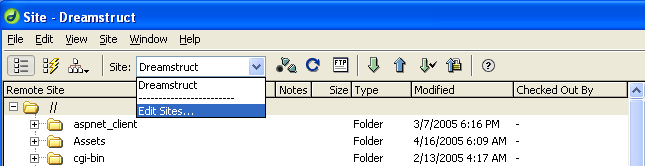
In Dreamweaver you click Site-->Site Files Then select "Edit Sites..." from the dropdown box as shown:


Navigate to this screen:


Before you click Okay, see where it says "Local Info" in the above graphic? Click it...


Now where it says Local Root Folder, click the yellow folder on the right to browse to a folder. You should try to make a new folder and call it "Websites" or something like that. Where it says HTTP Address, enter the URL to your web page. It does not have to be www.yourname.com it could be simply http://www.geocities.com/username/

Click Okay. Now you should be able to connect. In some applications this will just be a button that says "Connect"
In dreamweaver it is this button:

Now hopefully you should see all of your local files and now.... all of your remote files too! Hopefully. :) If not, you may want to read up more about FTP on the site of your web host.


BACK TO WEB HOSTS!

Why are we back to webhosts? Simple. Those free web hosts are not going to look super fancy with the 500 ads popping up in front of the visitors to your web site. This just looks plain ugly. If you check out brinkster.com in the above hosts list, you will find that this should not have any ads on the page. So you might go with this for developing your site, but remember someday you may want your own domain name. EX www.YourName.com

If you are going to make a good impression, you should go with a cheap web host. Two cheap hosts I recommend:
DynoNames.com
GoDaddy.com

Here is my real life example of how I set up a domain name.

I have used DynoNames below to buy two domain names. One of the names is MichellesMosaics.com, you may visit if you'd like.
How much is it? Well it depends on what you want for your domain. But for just the name it is $8.10 Total per year.
Yes that's it. But that is just for the name.

You might want to buy some privacy protection, which is an additional $8.95. This will protect you from people getting your email and personal address from your registered info. So in total I have paid:

$17.05 for MichellesMosaics.com

So this is $17.05 a year for a name and the protection of your privacy.

I believe GoDaddy.com is even cheaper than this so you may want to go with them.

However, you need a web host to host the name for you. To make it simple, you can just choose the hosting package that DynoNames or GoDaddy has for you. They will connect the server with the name, and voila! your web space is now connected to the name.

I recommend you start off with some sort of Basic package. Whatever the cheapest they have.

Personally, I have gone a step further and decided to use a different web host to host my files. Confused? It is confusing. Yes you can buy your domain name through one company, and actually have a different company host it for you. And I promise you, if you are afraid of doing this do not worry because Tech Support will be glad to help you out. In fact, they do all of the work for you.

Next.. Make money with a web page. More to come... Thanks for visiting.

By the way, (SEO) Search Engine Optimization, one special technique besides exchanging links with other sites is to create articles that relate to the content on your website. Definitely don't overlook making a link to a web page that is dedicated to exchanging links with sites that relate to yours.

Be sure to check out my domains:
http://www.dreamstruct.com/
http://www.michellesmosaics.com/
http://www.prodigyclassic.com/

Too confusing.. want someone else to do it? visit RentACoder.com !