Stellarium
This is a great free / freeware program to find stars, planets, constellations and many other astronomical objects.
To find your constellation in tonight's sky:
1) Download the free program at Stellarium.org
2) The program should be set to your time zone but if it's not hit the number
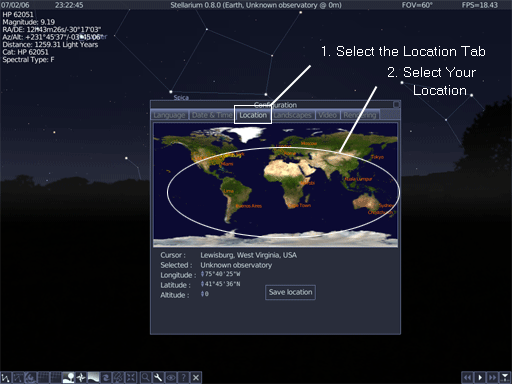
"1" on your keyboard. This will bring up the configuration screen
shown below.
Click the location tab and then hover your mouse over your approximate location. Click to select your location. Click Save location.
Now Stellarium knows your location.
3. Select the Date & Time tab.
Make sure the Date & Time tab is set to the current Date & Time. Default
is Eastern Time Zone so make sure Time & Date is set to where you are.
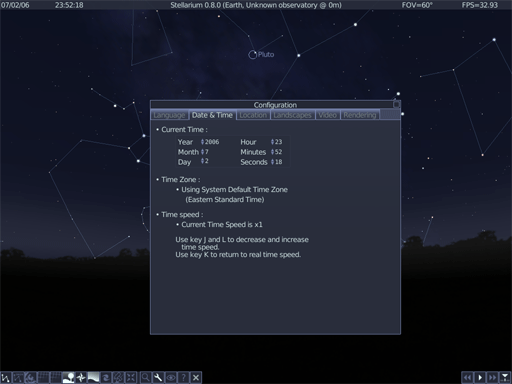
Click the small box in the upper right to close the window.
Now hold down the Ctrl key and press the letter " f ". ( ctrl+f ) This will open the Object Search box.
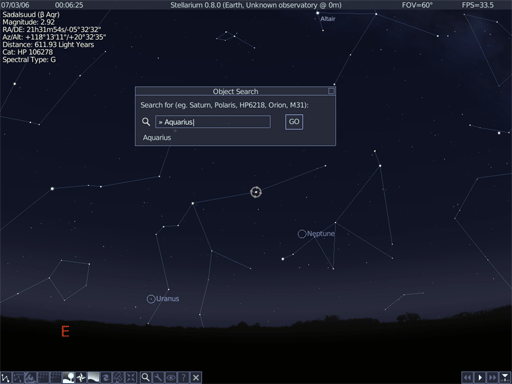
Type in the name of your constellation. For example Aries, Aquarius, Taurus,
Gemini, Pisces etc. and click the "Go" button. In this example I chose
"Aquarius".
Immediately your constellation will be located.
Note: Sometimes your constellation will not be visible
in the night sky. If all you see is black then your constellation is not visible
at this time.
Check to see if your constellation
is a Winter constellation or a Summer Constellation. If it is the correct season
for your constellation
then you should click
on the fast forward button located in the bottom right of the screen. You can
also jump ahead in time by pressing
the right bracket
key "]" to move ahead a week at a time. Clicking the middle "play"
button will bring you back to the current time.
Now the final step is to see what our constellation looks like along with it's
name so click on the 2nd and 3rd buttons as shown below.
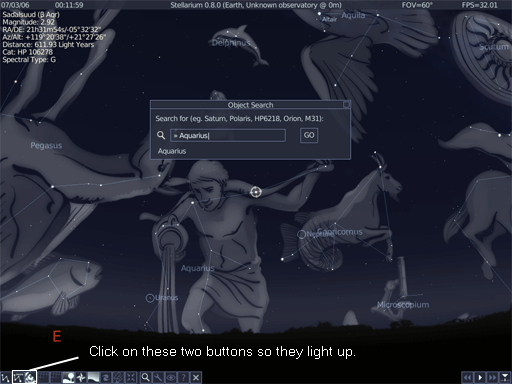
This reveals the constellation art and the name of the constellation. Above is Aquarius which is also known as (The Water Carrier).
Click here to close this window.